Category: Media & Technology Theories

  • Intrinsically motivating instruction (Malone)

    Intrinsically motivating instruction (Malone)

    Summary: Intrinsically motivating instruction takes place in computer gaming software when it provides players with choice around three key categories: challenge, curiosity, and fantasy.

    Originators and Key Contributors: Thomas W. Malone

    Keywords: challenge, choice, computer games, curiosity, fantasy, intrinsic motivation

    Intrinsically Motivating Instruction

    In trying to understand what made computer-based learning environments (CBLEs) fun and engaging, Dr. Thomas W. Malone studied computer games[1]. In doing so, Malone developed a theory of intrinsically motivating instruction. The three categories which comprise his theory are challenge, fantasy, and curiosity[2].

    Challenge: Each challenge must have a series of goals, which can be personally meaningful to the player and/or may be generated by the game to keep the player engaged. The game provides the player feedback on progress toward the goal throughout the game play. Because the computer game’s outcome is uncertain, this keeps the player engaged and motivated. When a player is challenged and succeeds through the struggle, a player’s self-esteem can increase, as long as the computer game’s feedback is constructive and supports learning. An optimal challenge should be neither too difficult nor too easy.

    Fantasy: Malone defines fantasy as the “mental images” the players create based on interacting with the environment. The most effective fantasies in computer games are those which are more fully integrated with the content to be learned (intrinsic). Incorporating intrinsic fantasies creates more engagement, which increases memory of the material, because they may satisfy players’ emotional needs and help them learn skills within a meaningful context. (An example that Malone describes is an Adventure game where players practice reading maps, writing instructions, and feeling excited, puzzled, and triumphant as they proceed through it.)

    Curiosity: Two types of curiosity are important to successful computer game creation—sensory and cognitive. Sensory curiosity is activated by the aesthetics of the game (its look, sounds, feedback, authentic creation of a world or event). Cognitive curiosity is activated by presenting opportunities for the player to better their knowledge.

    When a computer game is designed based on this framework, players are more motivated to play and learn[3].

    References

    1. Malone, T. W. (1981). Toward a theory of intrinsically motivating instruction. Cognitive Science, 5(4), 333-369.
    2. Malone, T. W., & Lepper, M. R. (1987). Making learning fun: A taxonomy of intrinsic motivations for learning. Aptitude, learning, and instruction, 3(1987), 223-253.
    3. Lepper, M. R., & Malone, T. W. (1987). Intrinsic motivation and instructional effectiveness in computer-based education. Aptitude, learning, and instruction, 3, 255-286.

  • Digital citizenship

    Digital citizenship

    Summary: Digital citizenship is the state of having access to the Internet and communication technologies that help promote equal opportunity, democracy, technology skills, and human rights.

    Originators and Key Contributors: Karen Mossberger, Caroline J. Tolbert, Ramona S. McNeal

    Keywords: citizenship, civic engagement, community, online society, rights

    Digital citizenship is the state of having access to Internet and Communication Technologies (ICTs) that help promote equal opportunity, democracy, technology skills, and human rights.

    Mossberger, Tolbert, and McNeal developed the phrase “digital citizenship” in response to the Internet becoming a place where many people consumed and discussed media and information[1]. Having consistent Internet access meant more exposure to a wider range of information and viewpoints and the opportunity to engage in dialog.

    When people have “full” digital citizenship, they have consistent access to the Web, and they use it regularly to learn skills, gain information, participate in conversations around issues that matter to them, create media about topics of concern, and perhaps even communicate with an elected official about their issues or concerns. They have more economic stability, which is based on having access to skills and information that may directly benefit their lives.

    When people do not have Internet access, they get less information and, therefore, cannot make as informed decisions for themselves or their wider communities. They also have less economic opportunity and lower skills, which creates harmful economic inequity. This creates lower levels of participation in the political process.

    In order to support a healthy democracy in the Internet age, it is recommended that governments provide their citizens with the digital tools to help them be fully included in socio-political processes to make their lives and extended communities better. When groups in society have widely varying states of digital citizenship, this can create a “digital divide” in which wealthier, more educated group have more Internet access than more poor, less educated groups. One solution for supporting widespread digital citizenship is by promoting more Internet access in people’s homes.

    To read more about digital citizenship, check out this book: Digital Citizenship–The Internet, Society, and Participation

    References

    1. Mossberger, K., Tolbert, C. J., & McNeal, R. S. (2007). Digital citizenship: The Internet, society, and participation. MIT Press.
  • SWOT Analysis Tool

    Summary: SWOT is an acronym that stands for strengths, weaknesses, opportunities and threats. A SWOT analysis is a tool or technique that can be used in business, design or personal settings to evaluate a project or company and to create constructive goals and strategies.

    Originators: George Albert Smith Jr., Kenneth Andrews, Albert S. Humphrey (1927-2005)

    Keywords: decision making, goals, strengths, weaknesses, opportunities, threats, strategy tool, management, business, external issues, internal issues, growth, performance

    Overview

    The exact origin of SWOT Analysis has been debated.[i] Some people believe that it originated in the 1950s at Harvard Business School and was the work of professors George Albert Smith Jr and Kenneth Andrews. Others believe it was created by Albert S. Humphrey in the 1960s during his time at the Stanford Research Institute. Regardless of its origins, SWOT analysis has become quite popular, and may be one of the most widely used management decision-making tools among business managers.

    SWOT Analysis gathers data about internal issues within a company or project  – strengths and weakness – and external issues outside of the company or project – opportunities and threats. It then analyzes this data to inform future goals, decisions, and strategies. The ultimate goal of SWOT analysis is to achieve a more successful outcome; for a company, the goal may be to improve performance and enhance growth.

    Application of SWOT Analysis

    One of the most appealing feature of SWOT analysis is its universal applicability. SWOT analysis can hypothetically be used by any type of organization as a decision-making tool. It can also be used by individuals for similar purposes. Consider the following examples.

    EdTech designers – As a project is created, SWOT analysis can identify factors that lead to the eventual success of the project, while also considering risks and areas that need improvement.

    Small and medium companies – SWOT analysis of small and medium companies can consist of formulating, implementing, and evaluating strategies that lead to improvements in productivity, performance, and successful operation of the company.[ii]

    Farming and agricultural development – Researchers have shown the use of SWOT Analysis in the context of farming and agricultural development in Iran.[iii]

    Private schools – SWOT analysis was used in an attempt to improve two different private schools. The researchers stated that the analysis benefited one of the schools by allowing it to “advance in the face of growing challenges thereby leading to its stability and increased productivity.”[iv]

    Nursing policy – Researchers have used SWOT analysis to consider the nursing policies of multiple European countries. Their analysis allowed them to identify factors that prevented collaboration between countries.[v]

    You can download a printable SWOT Analysis Template below (in Word and PDF formats).

    References

    [i] Madsen, D. O. (n.d.). SWOT analysis: A management fashion perspective. Retrieved from https://www.researchgate.net/profile/Dag_Madsen/publication/299278178_SWOT_Analysis_A_Management_Fashion_Perspective/links/56f05fee08ae70bdd6c94a74/SWOT-Analysis-A-Management-Fashion-Perspective.pdf

    [ii] Houben, G., Lenie, K., & Vanhoof, K. (1999). A knowledge-based SWOT –analysis system as an instrument for strategic planning in small and medium sized enterprises. Decision Support Systems, 26, 125-135.

    [iii] Ommani, A. R. (2011). Strengths, weaknesses, opportunities and threats (SWOT) anlysis for farming businesses management: Case of wheat farmers of Shadervan District, Shoushtar Township, Iran. African Journal of Business Management, 5(22), 9448-9454.

    [iv]Ifediora, C. O., Idoko, O. R., & Nzekwe, J. (2014). Organizations stability and productivity: The role of SWOT anlysis an acronym for strength, weakness, opportunities and threat. Internatinal Journal of Innovative and Applied Research, 2(9), 23-32.

    [v] Uhrenfeldt, L., Lakanmaa, R., & Basto, M. L. (2014). Collaboration: A SWOT anlysis of the process of conducting a review of nursing workforce plilicies in five European countries. Journal of Nursing Management, 22(4), 485-498.

  • Network Effects

    Summary: Network Effects describes the phenomenon how the value of a good or service increases as more people start to use that good or service.

    Originators: Theodore Vail (1845-1920), Robert Metcalfe (1946-Present)

    Keywords: network externality, demand-side economies of scale, marketing, customer base, value, monopoly, social media, congestion, good, service

    Certain products only have value if a large number of people are using them. A classic example is that of technology used for communication such as a phone or fax machine. Critical mass is needed — these devices are only valuable if lots of other people have phones that you can call and machines you can fax.

    This phenomenon was first described by Theodore Vail in 1908. Vail used the concept of Network Effects to build AT&T into a monopoly of telephone communication in the early 1900s. Later, Robert Metcalfe described Network Effects related to the importance of more people engaging in use of the Internet for it to become beneficial to everyone.[i]

    Both the Internet and the telephone are examples of Direct Network Effects, in which more customers directly increase the value of a product or service. There are also Indirect Network Effects, which occur when more customers indirectly increase the value of a product of service. For example, when more people use Uber, this does not directly make Uber more valuable. However, the more people who use Uber, the more Uber is motivated to improve the quality of their service, which ends up indirectly impacting the value of this service.[ii]

    Another prime example of Network Effects can be found in various social media services, such as Facebook. The more people who use Facebook, the more valuable Facebook becomes. This in turn, attracts more people to Facebook, as people do not want to miss out on a service that so many other people are using. Thus, Facebook continues to increase in value and attract more people at the same time.

    Using Network Effects to Improve Businesses

    Businesses who succeed at utilizing Network Effects can gain a competitive advantage in their industry. Consider two ways in which this can happen:

    1. Businesses can harness the power of Network Effects through engaging with products that are already highly valuable. They can consider what products are being used by a large number of people and consider utilizing those products within their business.

    For example, Visa is a type of credit card used by over 2.9 billion people. Businesses can make a point to accept Visa credit cards and gain more customers who might have gone elsewhere if the business only accepted cash.

    Businesses can harness the power of social media through advertising via various media platforms that are already popular and attract large numbers of people. 

    1. Businesses can create network effects within their own products and services through encouraging high engagement, interacting with customers, and providing high quality products.

    The reason many social media platforms developed high network effects is because they are engaging and interactive. This is a means of drawing new customers in and building up a client base to build value within the business.

    Once people engage with a product or service, businesses can focus on keeping products and services as high quality as possible. This keeps people engaged in the long run.

    References 

    [i] Easley, D. & Kleinberg, J. (2010). Networks, crowds, and markets. Reasoning about a highly connected world. Cambridge University Press.

    [ii] Clements, M. T. (2004). Direct and indirect network effects: Are they equivalent? International Journal of Industrial Organization, 22(5), 633-645.

  • Flipgrid: Video Discussion Tool for Fostering a Community of Learners

    A common criticism of educational theory is that it is often separated from practice. Educational technology tools are a strategic way to bridge the gap and design instruction centered around targeted learning theories. Flipgrid is a seamless and user-friendly tool that prides itself on building a student-centered community of learners. The basic premise of Flipgrid is that it gives teachers the power to create grids in which they or their students pose topics and other members of the class participate. There are powerful social learning features such as sharing, liking, and visual feedback for students. Flipgrid as a company loves to empower their users and is receptive to showcasing the tool in action. As can be evidenced through their dedication to accessibility, they go beyond lip service and design a technology that has the potential to provide truly transformative learning moments.

    Applying Theory to Practice

    Flipgrid is a flexible tool that could be used intentionally with different learning theories. At a high level, it fits into the social constructivist paradigm. Students are constructing their own understanding in a shared social setting. Going beyond the abstract, theories such as community of practice, problem-based learning, or social learning theory fit nicely as a design framework for Flipgrid. The actual learning theory used will depend on the design of the grid.

    The underlying features of Flipgrid that make it an appropriate tool for these types of theories are the opportunity for students to contribute their own response, to reply to their peers’ post, to engage with content from within their normal communication channels, and to articulate their understanding. Students who would normally have reservations in participating in class now have a platform for their voice.

    flipgridintroduction

    Fully Utilizing the Tool

    The vast number of educational technology tools available for teachers is overwhelming. The supply is constantly changing and different solutions rise and fade in popularity. As educators know, it is not enough to simply learn about the tool. We need a chance to observe the tool in action, to trial it in low-risk environments, and to reflect on our use of the tool in a community of practice.  EdTechGuides has a nice example of the Flipgrid tool in action.

    In order to optimize use of Flipgrid you should experiment and participate in your own Flipgrids. This is what is known as the sandbox space. Get used to what features are available in different subscription plans and how this tool would work in your classroom setting. Flipgrid is able to integrate with your Learning Management System or website. The five major features of Flipgrid are the grids, topics, responses, replies, and feedback.

    Grids: These are basically the home base for your classroom content. This is where students will go to view topics that have been posted and post their responses.

    Topics: Topics are started with a video and text explanation. Topics can revolve around anything you are studying or discussing in class.

    Responses: Students are able to respond to topics on a laptop or mobile device. They have the power to pause, record, delete, and flip their cameras in order to share their surroundings.

    Replies: Students can post replies to other video postings. Entirely new discussions are fostered through threaded video responses.

    Feedback: The feedback system allows for quick and rapid assessment through an emoticon rating scale. Advanced subscriptions also give the option for text feedback.

    Check our our video for the theory behind Flipgrid and its features:


  • Padlet: Collaborative Canvas Tool


    Padlet: An Easy to Use Online Collaboration Tool for Multimedia Sharing

    Padlet is a very user-friendly canvas or digital bulletin board that allows people to collaborate and insert anything (images, videos, documents, text) via drag and drop.  This tool is very flexible and can be used creatively in a classroom context in many ways.

    Equitable Participation

    Despite the recent trend in online learning towards personalization and competency-based learning, there is inherent value in learning from others. While this can be accomplished in the traditional brick-and-mortar classroom without technology, student participation is typically not even. Some students like to answer every question while others do not want to actively participate. Purposeful technology use can help to alleviate the problem of uneven student engagement in a physical classroom. When education is moved to the online environment, this intentional focus on connecting students to each other and the teacher is critical. Padlet is a tool that creates a student-centered learning environment that prompts participation and articulation of student understanding. Padlet is very intuitive to use and is functional across multiple devices. Flipping the classroom is only as powerful as the experience for students. Padlet strengthens this experience.

    Applying Theory to Practice

    The design of the Padlet will vary based on the learning theory used. It is, by nature, a social learning tool focused on students constructing their own knowledge. Digging a little deeper, a prompt that forces students to experience uncomfortable cognitive dissonance is feasible through constructive argumentation. Connectivism and the associated social network analysis is inherent through Padlet design features. The application of learning theories is as varied as the imagination of the classroom in which Padlet is used.

    There are five different styles of Padlet. They can range from a Pinterest style to a poll to a class debate. The tool is focused exclusively on fostering a shared sense of ownership, and subsequently, participation in the course. This social learning focus extends to the instructor through finding collaborators and model Padlets.

    Fully Utilizing the Tool

    With teaching, grading, communicating with parents, and volunteering teachers frequently have little spare time to investigate new teaching techniques. Sometimes, this is encountered through professional development. However, it is hard to integrate these technologies into everyday teaching practices. When the tool has a low learning curve and the ability to try without financial repercussions it becomes more attractive to teachers. To observe the tool being used check out our guide over at EdTechGuides.

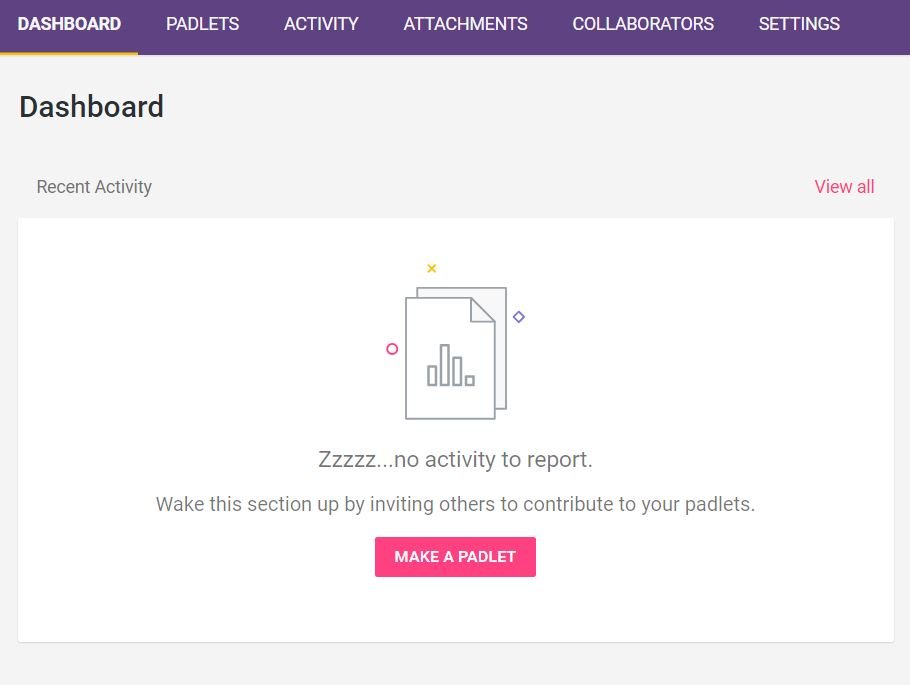
    Padlet is free to use. However, if you want to use Padlet Backpack, it provides an additional layer of customization and privacy for your classroom. The Padlet is constantly saved and has availability in 29 languages. There are different levels of access based on the stakeholder role. Padlet is able to work with virtually any file type or embedding directly from various apps. The home page will have your dashboard, Padlets, activity, attachments, collaborators, and settings.

    Dashboard: This is your home page. At this page, you will see any recent Padlets and contributions to those Padlets.

    dashboard

    Padlets: This page lists all of the Padlets you have created. This is where you select those five different Padlet types. These types allow for customization and the application of different theories of learning.

    padlets

    Activity: Recent activity will show here in greater detail than on the dashboard.

    Attachments: If there is any attachment being used in a Padlet, this is where it can be uploaded and shared.

    Collaborators: Using this feature, teachers can find both local and distant collaborators with which to create or build upon existing Padlets.

    Settings: Allows users to choose their preferences and reset their username and password. This is also where you can control overall privacy settings.


  • ExploreLearning: Active Experimentation


    Science and math concepts are often some of the most challenging for students to grasp. It is not enough to listen to a teacher talk about concepts and then complete standard assignments. Rather, a learner must be able to learn from the teacher in addition to interacting with simulations and experiments. Physical science experiments and mathematical manipulatives are great ways to practice inquiry. However, they are not suitable for all concepts or learning environments. ExploreLearning Gizmos provides a holistic learning experience, featuring a large library of over 400 simulations.

    explorelearningfizmos

    Reasons Physical Manipulation is Insufficient

    In a comprehensive review of virtual and physical science labs it was found that the ideal science laboratory curriculum contained both physical and virtual labs (De Jong, Linn, & Zacharia, 2013). This is because they each have different affordances and constraints and can complement each other. Virtual simulations afford the opportunity to practice multiple times with a phenomena and to explore concepts that can’t be a physical lab. When it comes to learning environments, virtual simulations and manipulations are often the only type of inquiry experience that online students have. They can also be used for home school or homebound students. ExploreLearning is a comprehensive science and math software that comes complete with differentiated simulations, teacher guides, student worksheets, assessments, and state and national standards. The virtual simulations in ExploreLearning are known as Gizmos and these terms will be used interchangeably.

    Applying Theory to Practice

    A limiting feature of virtual simulations is that they do not create the ill-structured, problem-solving environment that is so foundational to the practice of math and science. However, ExploreLearning scaffolds students so that by the end of the worksheet, they are expected to control confounding variables and operate the simulation in order to solve a research question. Broadly speaking, ExploreLearning falls under the scope of constructivism. More specifically, it falls under the scope of project-based learning, cognitive dissonance, or Kolb’s experiential learning cycle. These learning theories are complementary and could be seen in the same learning sequence depending on the perspective someone takes.

    Utilizing ExploreLearning

    ExploreLearning comes with a free trial to assign as many simulations as you want to your students. This allows you to try the product without fully creating a course and tracking student assessment data over courses. With this trial, you are able to download the student guide and have students take the quiz at the end of the simulation.  EdTechGuides provides nice example of the ExploreLearning tool in action. All of the instructional design is already done and the simulations are ready to use. This reduces the time a teacher needs to devote to creating a lesson plan from scratch.

    ExploreLearning has several nice features, not limited to:

    Differentiated Gizmos: Students in the same grade level are going to have vastly different abilities. ExploreLearning has created the same Gizmo at multiple developmental levels. This allows you to assign Gizmos based on the student’s level while ensuring that everyone is engaging with the same content.

    Recommended Gizmos: Based on previous searches and selections, ExploreLearning is able to give you a recommendation as to what other simulations would be of relevance to you.

    Searching by Standards: ExploreLearning has aligned Gizmos with multiple different standards from individual states to the Next Generation Science Standards and Common Core. This is particularly helpful if you have an articulated curriculum that mandates when concepts are taught.

    Responsive Design: Gizmos work on a variety of devices and sizes including PC, iOS, Chromebooks, and Android devices.

    Take a look at our Learning-Theories.com tutorial video for using ExploreLearning Gizmos below.

  • Educational Robotics and Constructionism (Papert)

    Educational Robotics and Constructionism (Papert)

    Summary: Constructionism as a learning theory emphasizes student-centered discovery learning, and educators are currently expanding its reach to the field of educational robotics in order to engage students.

    Originators and Key Contributors: Seymour Papert took Piaget’s theory of constructivism and adapted it into his theory of constructionism.

    Keywords: constructivism, constructionism, learning theory, discovery learning, educational robotics, technology

    (more…)

  • Dopamine, Games, and Motivation

    Dopamine, Games, and Motivation

    Summary: Dopamine plays a role in motivation, and this role is important to understand in the context of game design. Understanding how dopamine motivates can help game designers produce games that are interesting, effective, and ethical.

    Originators and Key Contributors: Henry Chase and Luke Clark presented a study in 2010 that suggested that dopamine was not linked to pleasure as previously understood. By studying groups of gamblers, they found that release of dopamine occurred whether there was a stressful situation presented or a rewarding one[1]. In 2012, a team of Vanderbilt researchers published a study with influential repercussions on our understanding of dopamine and its relationship to motivation. They found a difference in dopamine’s effects based on which areas of the brain expressed higher levels of it[2].

    Keywords: dopamine, motivation, addiction, game, reward

    (more…)

  • Uses and Gratification Theory

    Uses and Gratification Theory

    Summary: Uses and gratification theory (UGT) is an audience-centered approach that focuses on what people do with media, as opposed to what media does to people.

    Originators and Key Contributors: Uses and gratification theory builds off of a history of communication theories and research. Jay Blumler and Denis McQuail laid the primary groundwork in 1969 with their categorization of audience motivations for watching political programs during the time of the 1964 election in the United Kingdom[1]. This eventually led them to develop UGT later on with their colleagues[2][3][4].

    Keywords: gratification, media, audience, entertainment, mass media, communication

    (more…)